介绍
- react-native 字体图标库
- 支持字体图标库
- AntDesign
- Entypo
- EvilIcons
- Feather
- FontAwesome
- FontAwesome 5
- Fontisto
- Foundation
- Ionicons
- MaterialIcons
- MaterialCommunityIcons
- Octicons
- Zocial
- SimpleLineIcons
如何安装
yarn add react-native-vector-icons (yarn add @types/react-native-vector-icons -D)
执行 ios pod install
- cd ios
- pod install
进到 node_modules/react-native-vector-icons,将需要使用的字体文件 copy 到项目中
修改 info.plist, 右键打开,open as => source code, 复制以下代码
    <key>UIAppFonts</key>
    <array>
        <string>Fonts/AntDesign.ttf</string>
        <string>Fonts/Entypo.ttf</string>
        <string>Fonts/EvilIcons.ttf</string>
        <string>Fonts/Feather.ttf</string>
        <string>Fonts/FontAwesome.ttf</string>
        <string>Fonts/FontAwesome5_Brands.ttf</string>
        <string>Fonts/FontAwesome5_Regular.ttf</string>
        <string>Fonts/FontAwesome5_Solid.ttf</string>
        <string>Fonts/Foundation.ttf</string>
        <string>Fonts/Ionicons.ttf</string>
        <string>Fonts/MaterialIcons.ttf</string>
        <string>Fonts/MaterialCommunityIcons.ttf</string>
        <string>Fonts/SimpleLineIcons.ttf</string>
        <string>Fonts/Octicons.ttf</string>
        <string>Fonts/Zocial.ttf</string>
        <string>Fonts/Fontisto.ttf</string>
    </array>
关联字体文件
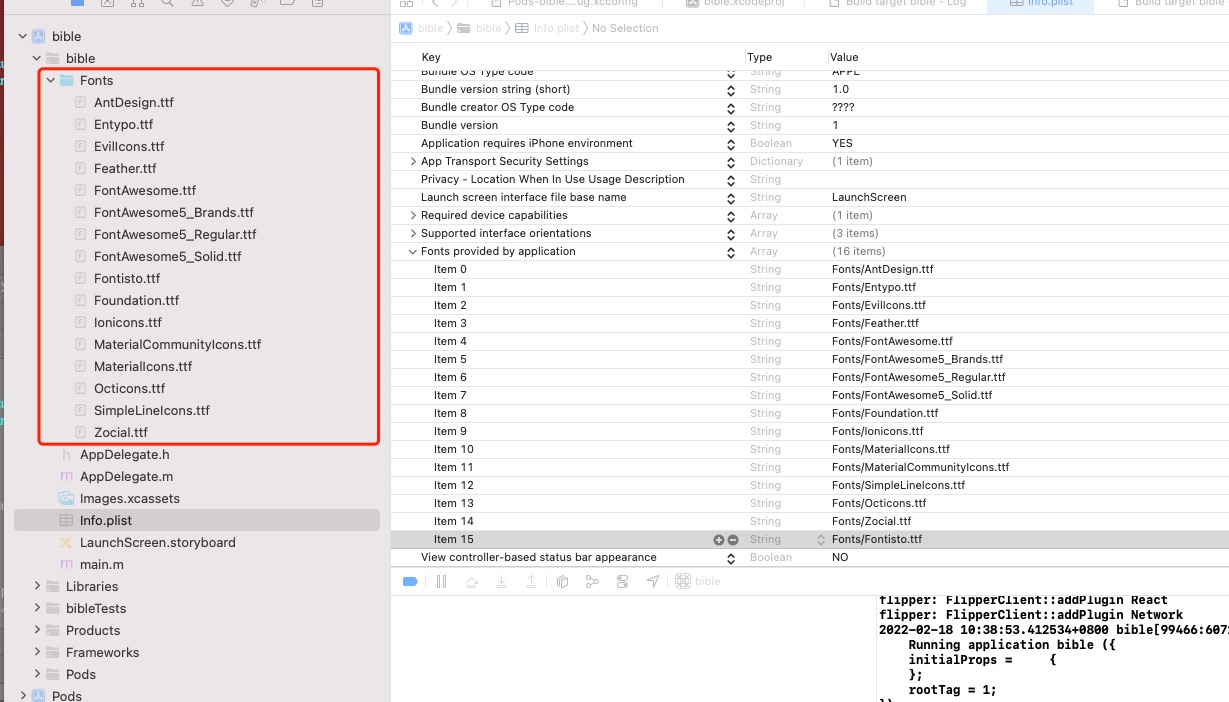

- 删除 ios/build, 重新构建使用